How Freelancers Can Manage Client Projects Without Paying for Jira or Asana
 Pankaj Sharma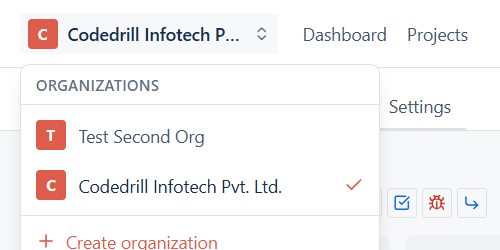
If you freelance and work with more than one client at a time, you already know this problem well. Your client wants to see progress. You do not want to pay for a Jira or Asana seat just so they can peek at three tasks a week. And keeping track of five different clients in five different tools, or worse, five different spreadsheets, gets old fast.
Here is how to actually solve this, without paying enterprise prices for a one-person business.
The real problem is not the task list
Most freelancers can manage their own to-do list just fine, a notebook, a Notion page, whatever works. The actual pain point is client communication. Clients want to know what is happening, but they do not want a daily WhatsApp update, and you do not want to write one either.
What you actually need is one place where your client can log in, see what is done, what is in progress, and what is waiting on them, without you doing manual updates every single day.
Separate organisations for separate clients
In Projevio, you are not stuck with one giant workspace where everything gets mixed together. You can set up a separate organisation for each client, or one organisation with separate projects, whichever fits how you actually work. Switching between them takes one click from the top of the screen, so hopping from Client A's board to Client B's board is quick, not a hunt through bookmarks.
Give clients visibility, not access to everything
This is the part that usually annoys freelancers about client-facing tools. You either give the client full access (so they see your internal notes, your time estimates, everything) or you keep them out entirely and update them manually.
Projevio has a simple client-visible toggle on every task. Turn it on for things you want the client to see, keep it off for internal notes, rough estimates, or anything you are still figuring out. Your client sees a clean, honest board without seeing the messy behind-the-scenes part.
Use the board the way it is meant to be used
Set up your columns as To Do, In Progress, Testing or Review, and Done. When you pick up a task, move the card to In Progress. Once it is ready for the client to check, move it to Testing or Review. Once they approve it, move it to Done. Your client can literally watch the card move across the screen instead of asking "any updates?" over email.
No per-seat pricing to worry about
This is the actual reason most freelancers avoid Jira or Asana for client work, the moment you invite a client, you are paying for another seat. Projevio does not charge per user, so you can add every client you work with, plus any subcontractor or collaborator, without your bill growing every time your business grows.
Keep it simple
You do not need workflow schemes or a project management certification to run this. Set up a board, add your tasks, invite your client, turn on visibility for what they should see, and get back to actual billable work. And right now, the first 500 teams to sign up get it free, forever, which for a freelancer watching every rupee or dollar of overhead, is not a small thing.
Written by
Pankaj Sharma