Projevio vs Trello: Which Is Better for Small Agencies and Freelancers?
 Pankaj Sharma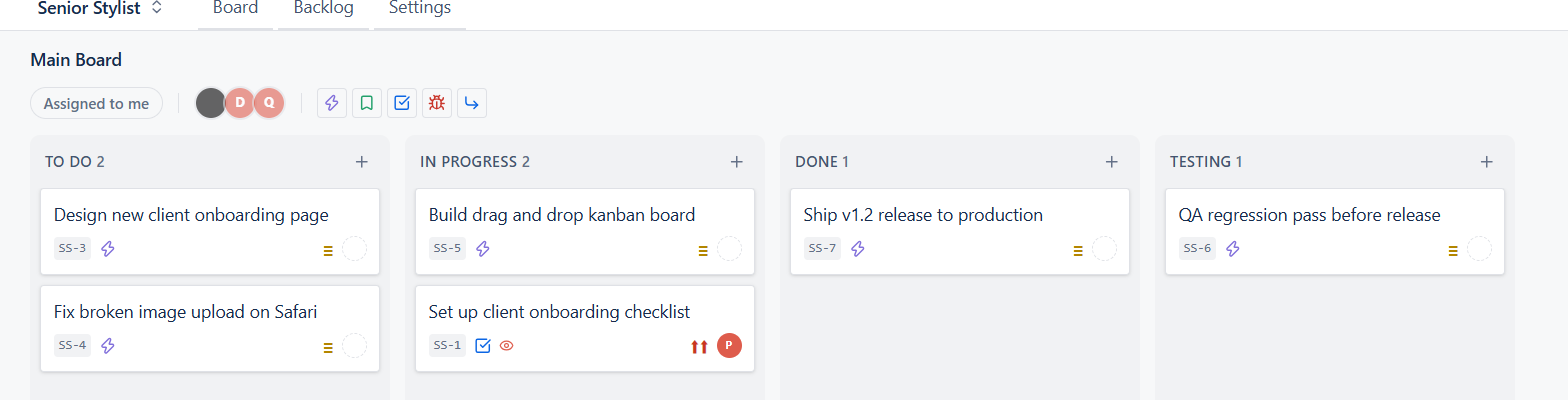
Trello is probably the most well known kanban tool out there. It is simple, and for a personal to-do list or a tiny side project, it works great. But once you start running client work through it, with a team, a workflow, and people outside your company who need to see progress, the cracks start to show.
We built Projevio for exactly that gap. So here is a fair, honest comparison, not a "we are better at everything" pitch, because that would not be true either.
Boards and workflow
Trello gives you lists. You name them whatever you want, To Do, Doing, Done, and you move cards between them. That is it. There is no real concept of a workflow, no status behind the scenes, just the list name.
Projevio also gives you a board, but with real workflow columns behind it, To Do, In Progress, Testing, and Done. When a card moves from In Progress to Testing, the system actually understands that the item is now waiting for QA or client review, not just sitting in a differently named list. You can even add your own columns and statuses per project if your workflow needs more steps, without any admin setup.
Working with clients
This is where the gap is biggest. In Trello, if you want a client to see progress, you either invite them to the whole board (so they see everything, including internal notes) or you keep a separate board just for them and update it manually. Neither is great.
In Projevio, every card has a simple Client visible toggle. Flip it on for the tasks you want your client to see, and keep internal debugging notes, estimates, or awkward bugs hidden. Your client logs in and sees a clean, honest view of what is happening on their project. No manual copy-pasting into a separate doc.
Number of people you can add
Trello free plan works fine solo or in a very small group, but growing a team or adding clients on the free tier gets tight fast, and card and workspace limits start to matter. Projevio does not charge per seat and does not cap how many people you invite, your whole team and your clients can be on it without you doing seat math every time someone joins.
Organising bigger projects
Trello handles small projects fine, but once you have multiple clients or multiple modules within one project, you end up creating a pile of boards or a messy label system to keep things sorted. Projevio has Components, so you can tag work by area, say "Website", "Mobile App", "Billing", and filter your board instantly by that. If you run more than one project or more than one client, you also get a proper organisation and project switcher, so jumping between client accounts takes one click, not a bookmark folder.
Notifications
Trello sends you an email or notification more or less immediately when something changes, which sounds helpful until someone assigns and unassigns a card by mistake and you get three emails for nothing. Projevio waits a few minutes before sending assignment or comment emails, so accidental changes do not spam anyone, and multiple comments on the same task get bundled into one email instead of five.
Where Trello is still fine
If you genuinely just need a personal task list, or a two-person project with no client involved, Trello is simple and it works. We are not going to pretend otherwise.
Where Projevio makes more sense
If you are running an agency, managing multiple clients, and you need your team and your clients on the same page without paying per seat, that is exactly what we built. And the first 500 teams that sign up get it free, forever.
Written by
Pankaj Sharma